The rent roll
Every rent month for every lease, with what is due, paid and still owing.
The rent roll tells you at a glance who's paid this month. Open Rent Roll in the sidebar.
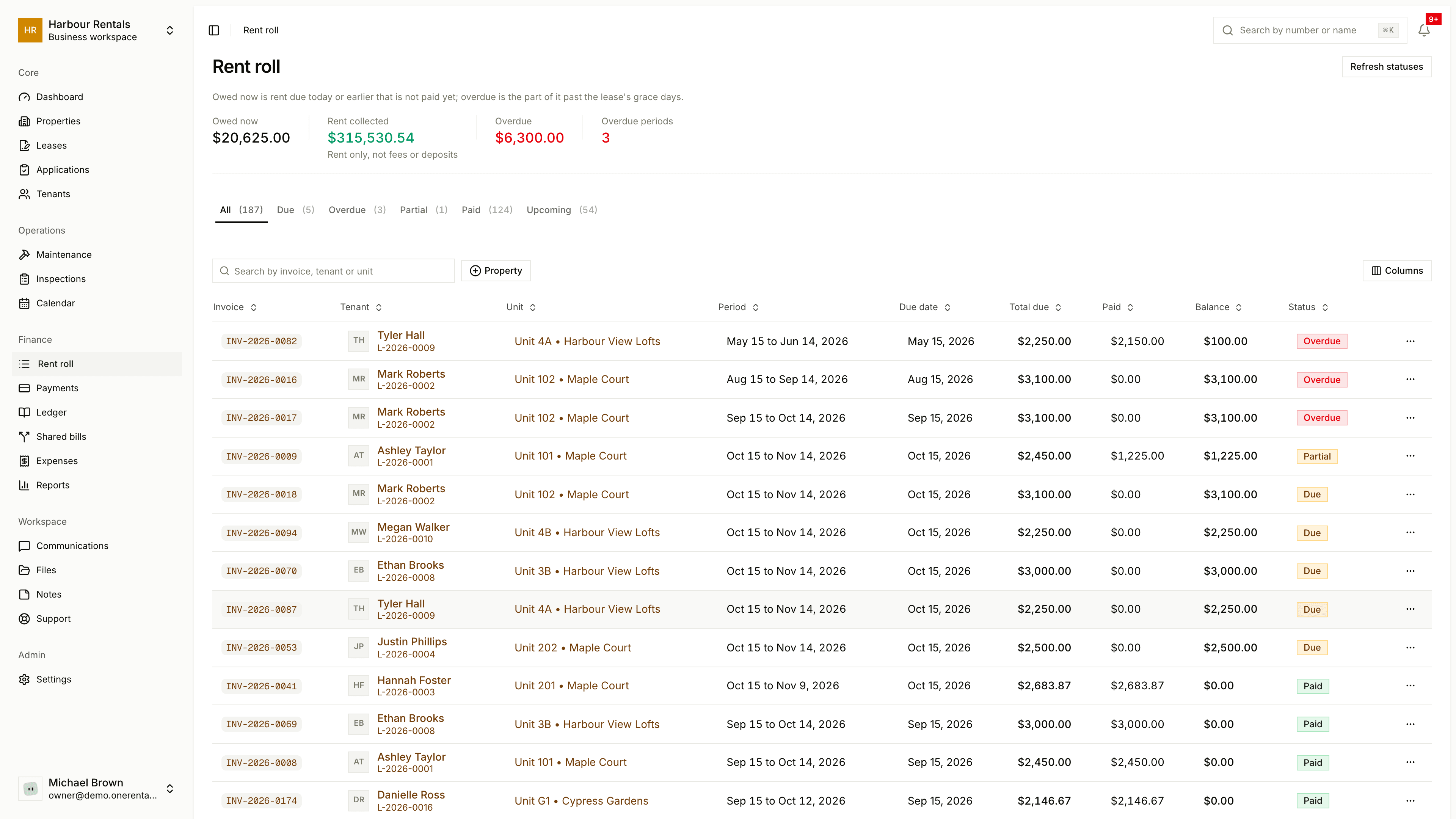
What you see
The top shows Total Due, Total Collected, Total Overdue and how many months are overdue. Use the tabs to filter: All, Due, Overdue, Partial, Paid and Upcoming, each with a count.
Each row is one rent month for one lease, with its invoice number, tenant, unit, period, due date, Total Due, Paid, Balance and status. A month only turns Overdue after the lease's grace period. See Overdue rent and late fees.
Statuses update on their own, but if something looks out of date, click Refresh Statuses at the top.
Do things from a row
Click the ... at the end of a row:
- View Invoice opens that month's invoice.
- Record Payment logs a payment against it.
- Send Reminder emails the tenant (for months that are due or upcoming).
- Overdue Notice opens a notice for an overdue month.
If the list's empty, that's because rent months are only created once a lease becomes active. See Create a lease.