Reports at a glance
Find the right report for taxes, collections, vacancies and spending.
Reports turn what you've recorded into answers: how much you made, who owes you, which units are sitting empty. Open Reports in the sidebar.
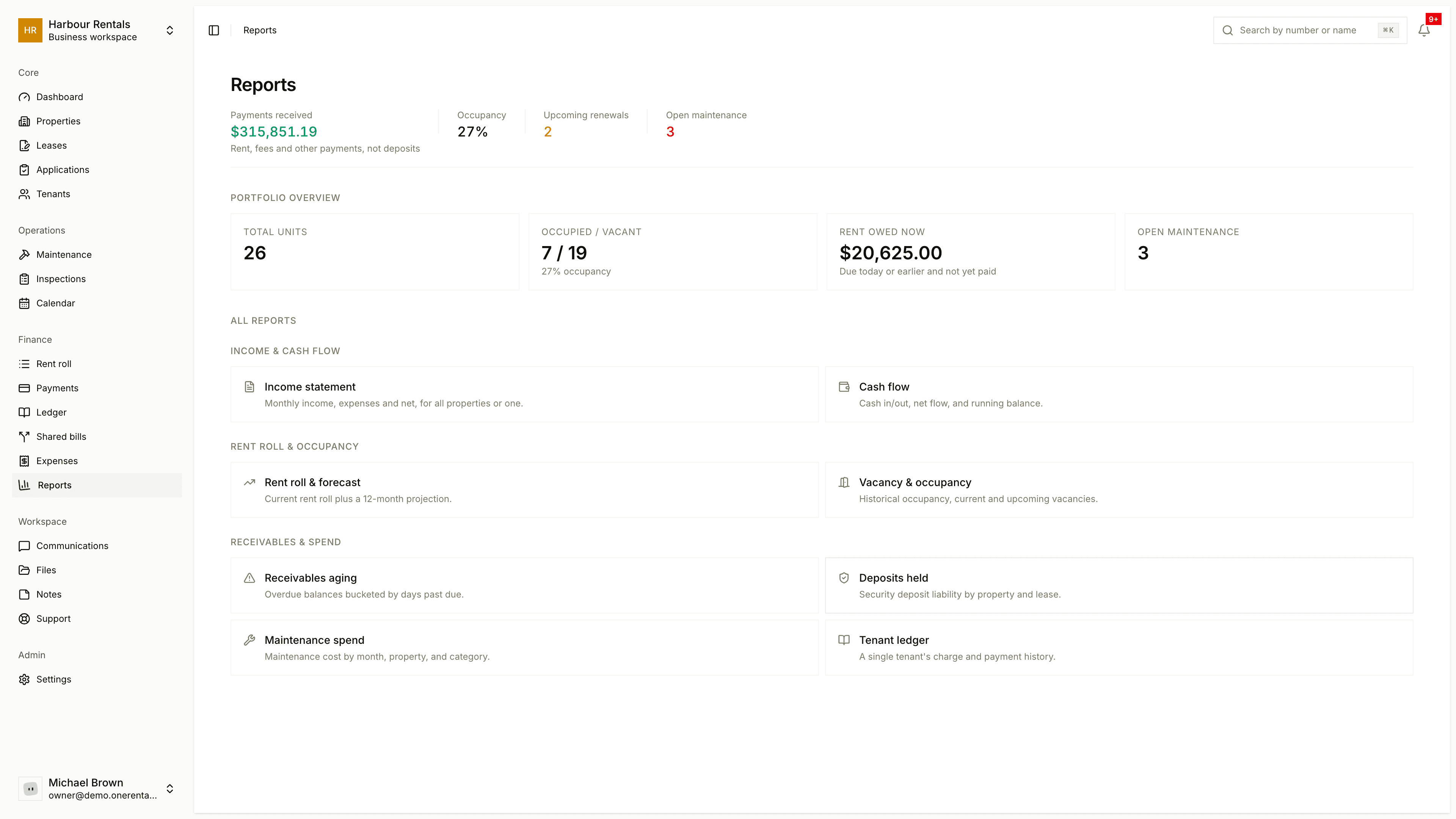
At the top you'll see Collected, Occupancy, Upcoming Renewals and Open Maintenance, then a portfolio overview. The reports themselves come in three groups:
| Group | Report | Plan |
|---|---|---|
| Income and cash flow | Income Statement | All plans |
| Cash Flow | All plans | |
| Rent roll and occupancy | Rent Roll and Forecast | Pro |
| Vacancy and Occupancy | Pro | |
| Receivables and spend | Receivables Aging | Pro |
| Deposits Held | All plans | |
| Maintenance Spend | All plans | |
| Tenant Ledger | All plans |
On a plan below Pro, the three Pro reports show an upgrade prompt instead of figures. See Billing and plans.
Using a report
Reports that cover a stretch of time have From and To dates and a Property filter at the top, and Clear resets them. Every report has Export CSV and Export PDF buttons.
A report can only show what you've recorded, so the more up to date your payments and expenses are, the more useful your reports will be.