Your rent and payments
Check what you owe, see your invoices and receipts, and find out about online payments.
The Payments page shows what's still due and whether your last payment has been recorded.
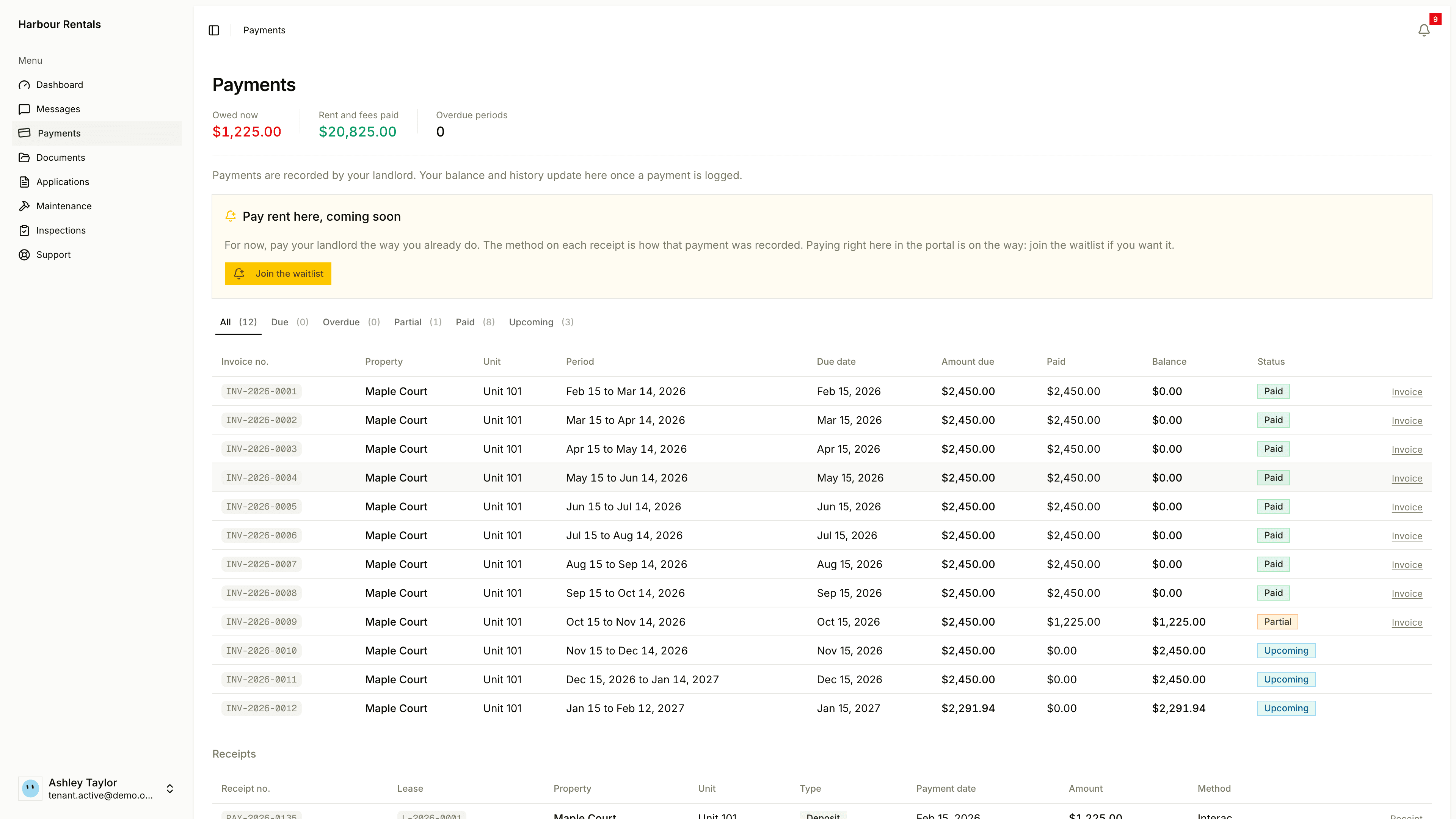
Where you stand
Across the top:
- Balance Due: what you still owe.
- Total Paid: everything you've paid so far.
- Overdue Periods: how many rent periods are late. Zero is what you're after.
Invoices
The table lists each rent period with its Invoice No., property, unit, period, Due Date, Amount Due, Paid, Balance and Status. Use the tabs (All, Due, Overdue, Partial, Paid, Upcoming) to narrow it down, and click Invoice on a row to open that invoice.
Partial means you've paid some of that period and the rest is still due.
Receipts
Under Receipts there's a line for each payment, with the receipt number, payment date, amount and method. A security deposit is marked Deposit, so it's easy to tell apart from rent.
Paying your rent
Your landlord records your payments, which is why the page says "Payments are recorded by your landlord". Your balance updates once they've logged a payment. If you've paid and it's not showing, ask your landlord to record it.
You can't pay online yet. If you'd like to, click Join the waitlist.
Messages about rent also show up in Messages.