Ask for a repair
Tell your landlord something needs fixing and follow it until it's done.
A dripping tap or a dead heater gets fixed faster when your landlord has the details in writing. Send a request from the portal and you can follow it until it's done.
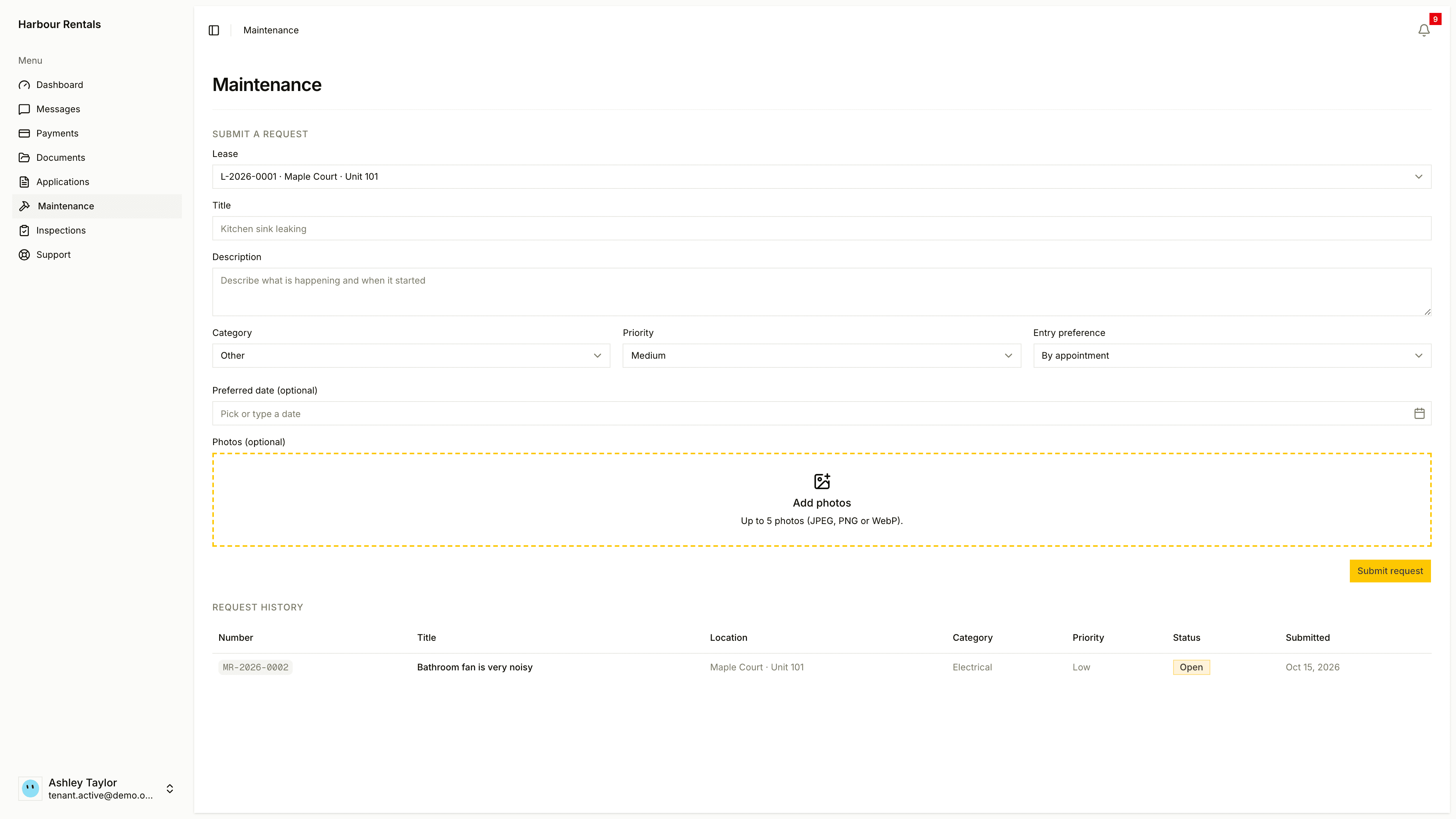
Send a request
Open Maintenance. Under Submit a Request, choose your Lease. If you live in a shared home, use What is it about to pick your room or a shared space.
Add a short Title (like "Kitchen sink leaking") and a Description of what's happening and when it started.
Pick a Category and Priority.
Set your Entry preference: Entry allowed, Do not enter without me or By appointment. Add a Preferred date if you have one, and some Photos, which help your landlord respond faster.
Click Submit Request.
Only the main tenant on a lease can send a request. If you're a co-tenant, ask them to send it.
When to pick urgent
Save urgent for no heat or hot water, water leaks or flooding, broken entry locks or windows, electrical hazards, or pests.
Follow it
Request History shows each request with its number, title, location, category, priority, status and date. A request starts as Open (received), moves through In progress and sometimes On hold, and ends up Completed, or Cancelled.
If your landlord has the notice turned on, you'll also get an email when the status changes.
In a shared home, you can also see requests about your shared spaces, but you can only read those.