Your dashboard
See what you owe, when rent is next due and what your lease covers, all on one page.
Your Dashboard answers the two things most tenants want to know: how much do I owe, and when's it due?
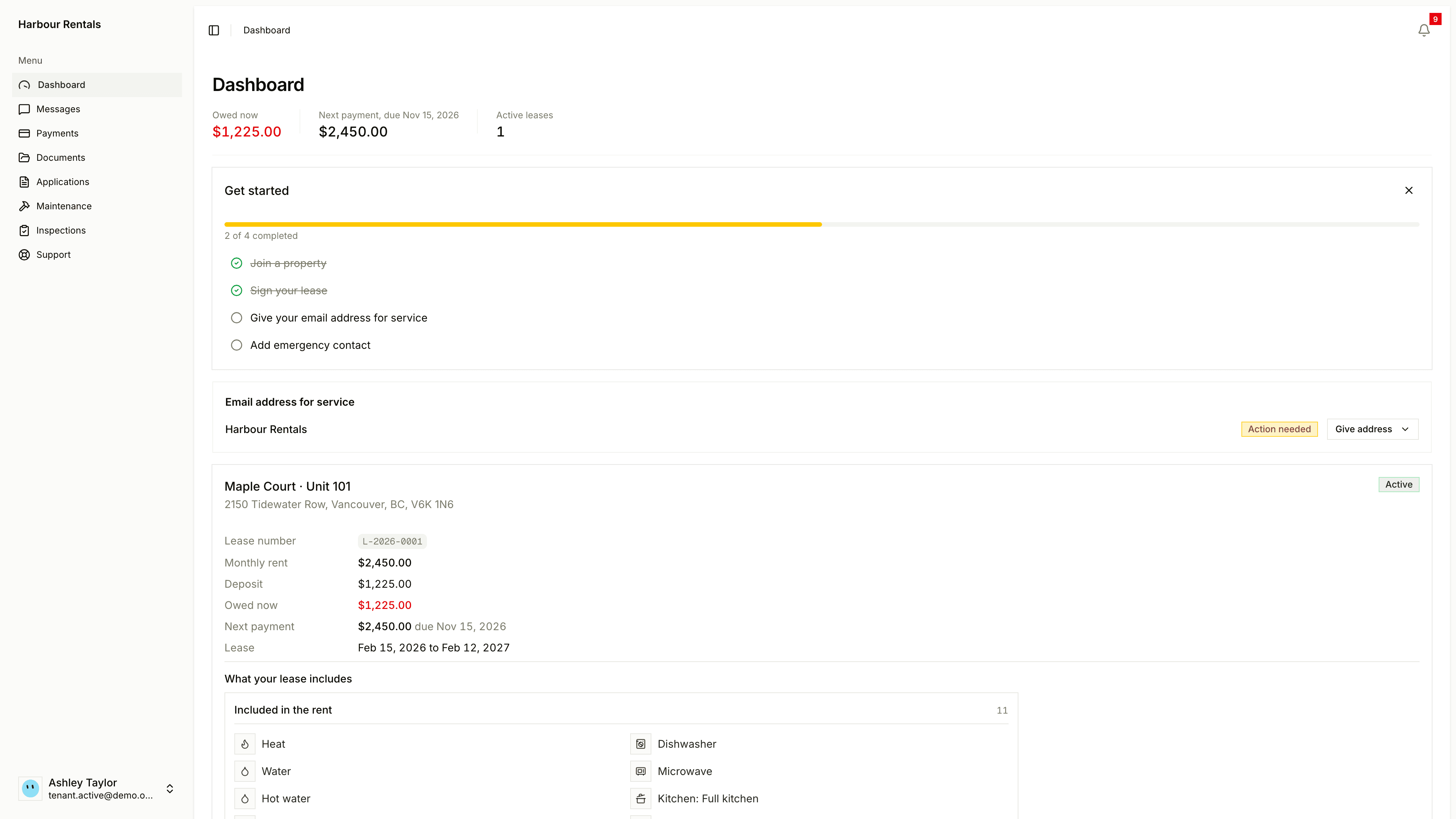
The top line
Three figures sit across the top:
- Total Balance Due: what you owe across your leases. It turns red when it's more than zero.
- Next Payment Due: the date and the amount.
- Active Leases: how many you have.
Your landlord enters your payments, so your balance updates once they've recorded one. You can't pay online yet. See Your rent and payments.
Things to do
- A banner lets you know when documents are waiting for your signature. Click Sign Document to review and sign. See Your lease and signing.
- Get started is a short checklist, with things like giving an email address for service or adding an emergency contact. Click the cross to dismiss it.
- Email address for service shows your landlord and whether you need to do anything. See Address for service.
Your lease card
Each lease has a card with the property, address and status (like Active or Draft). It shows the lease number, Monthly rent, Deposit, Balance, Next Due and the lease dates.
Under that, What your lease includes shows what's Included in the rent, what's Not included and the Policies, like pets and smoking. It's a copy of what was agreed for your lease.