The inspections queue
See what is due, what is late and what is waiting on someone.
Open Inspections in the sidebar and you'll see your to-do list for walk-throughs, reviews and signatures.
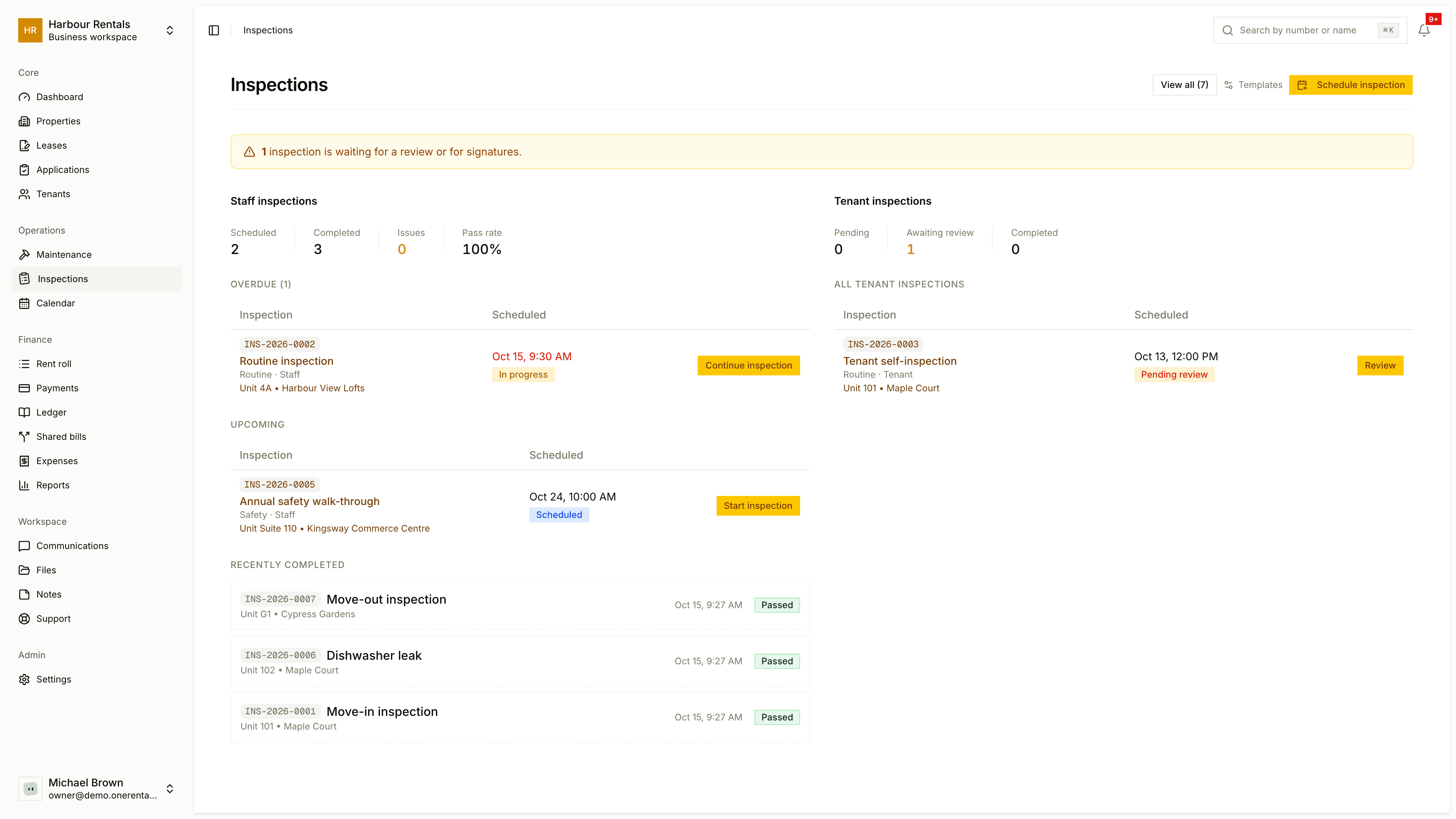
What the queue shows
If anything's waiting on a review or signatures, a banner at the top tells you how many.
Staff Inspections are the ones you or your team do:
- A bar shows how many are Scheduled and Completed, how many have Issues, and your Pass Rate.
- Overdue lists anything past its date.
- Upcoming lists what's due in the next two weeks.
- Recently Completed shows the latest finished ones.
Tenant inspections are the ones tenants do themselves. You'll see how many are Pending, Awaiting Review and Completed, with the full list under All Tenant Inspections.
See them all
Click View all for every inspection in one searchable, filterable list. Each row shows the number, title, location, status, who did it, when it was scheduled and completed, and two deadlines: Copy due by and Deposit due by. If a copy's late, it's flagged Overdue.
Open one
Click any inspection to open it, then Start inspection (or Continue inspection) to go to the walk-through. Each one has a number like INS-2026-0001 you can search for from the top of any page.
Your checklists live under Templates at the top of the page. See Inspection templates.